
Introduction
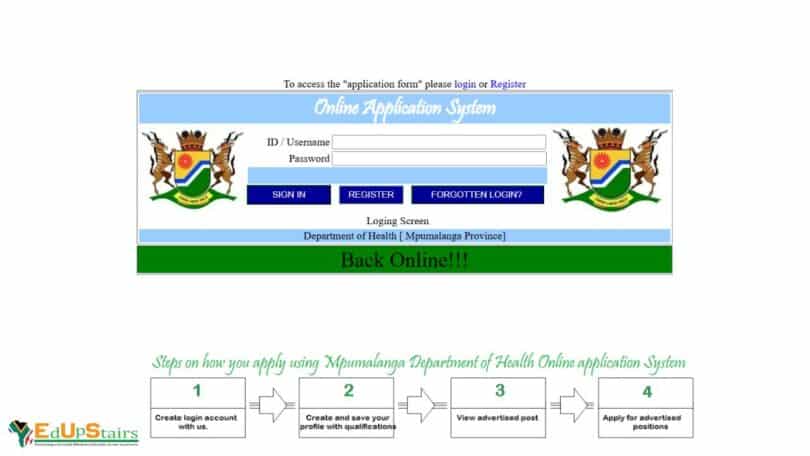
The Mpumalanga Department of Health offers a centralized e-Recruitment platform designed to streamline applications for various government job opportunities. These include entry-level positions, internships, learnerships funded by Sector Education and Training Authorities (SETAs), and roles within the Expanded Public Works Programme (EPWP). This guide provides a detailed walkthrough on registering and applying through the platform, ensuring you can effectively navigate the system and access available opportunities.
Step-by-Step Guide to Register on the e-Recruitment Portal
- Access the e-Recruitment Portal
Begin by visiting the official Mpumalanga Department of Health e-Recruitment website: https://ehr.mpuhealth.gov.za/OnlineApp
This portal serves as the primary platform for job applications within the department.Log in or sign up to view
- Create an Account
- Click on “Register”: Locate and select the ‘Register’ option to initiate the account creation process.
- Provide Personal Details: Enter accurate information, including your full name, South African ID number, contact details, and a valid email address.
- Set Login Credentials: Choose a secure username and password combination for future access.
- Confirm Registration: After submitting your details, you may receive a confirmation email. Follow the instructions to verify your account.
- Complete Your Profile
Once registered, log in to your account and complete your profile:
- Educational Background: Detail your academic qualifications, including institutions attended and dates.
- Work Experience: List any previous employment, internships, or volunteer work, specifying roles and durations.
- Skills and Competencies: Highlight relevant skills, certifications, and proficiencies.
- Languages: Indicate languages spoken and proficiency levels.
- Disability Status: If applicable, provide information regarding any disabilities.
- Upload Supporting Documents
Prepare and upload clear, certified copies of the following documents:
- Curriculum Vitae (CV): An up-to-date CV outlining your qualifications and experience.
- Identity Document: A certified copy of your South African ID.
- Educational Certificates: Certified copies of your academic qualifications.
- Additional Certifications: Any other relevant certificates or licenses.
Ensure each document is correctly labelled and in an acceptable format (e.g., PDF, JPEG).
Exploring Available Opportunities
The department frequently advertises entry-level roles suitable for individuals with minimal work experience. Common positions include:
These roles typically require a Grade 10 or 12 qualification.
Internship programs are available for graduates seeking practical experience in their field of study. Details include:
- Duration: 12 to 24 months
- Stipend: Approximately R4,000 – R6,000 per month
- Eligibility: Applicants must possess a relevant diploma or degree and be between 18 and 35 years old.
Learnerships combine theoretical learning with practical workplace experience. They are often funded by SETAs such as:
- PSETA: Public Service Sector Education and Training Authority
- LGSETA: Local Government SETA
- HWSETA: Health and Welfare SETA
- ETDPSETA: Education, Training and Development Practices SETA
Programs typically last 12 months and may offer a stipend.
Expanded Public Works Programme (EPWP)
EPWP provides temporary work opportunities aimed at skills development and poverty alleviation. Positions may include:
- Community Health Workers
- Maintenance Workers
- Food Aid Assistants
These roles often require minimal qualifications and are ideal for individuals seeking short-term employment.
Application Process
Search for Vacancies
Navigate to the ‘Vacancies’ section on the e-Recruitment portal to view current job listings. Use filters to narrow down opportunities based on job type, location, or department.
Submit Applications
- Select a Position: Click on the job title to view detailed information, including requirements and responsibilities.
- Apply Online: Click the ‘Apply’ button and follow the prompts to submit your application.
- Attach Documents: Ensure all required documents are uploaded and correctly labeled.
- Confirmation: After submission, you should receive a reference number or confirmation email.
Application Tips
- Accuracy: Double-check all information for accuracy and completeness.
- Deadlines: Submit applications before the specified closing dates.
- Follow Instructions: Adhere to any specific application instructions provided in the job listing.
EDUPSTAIRS IS A REGISTERED NON-PROFIT ORGANISATION NPO No: 232 – 182, PUBLIC BENEFIT ORGANISATION (PBO): 930066984. EDUPSTAIRS DOES NOT, IN ANY WAY OR FORM, SOLICIT MONEY OR CV’S FROM PEOPLE FOR JOBS. PLEASE BE AWARE OF PHONY JOB POSTINGS AND RECRUITMENT FRAUD. FOR MORE INFORMATION VISIT OUR SCAM/FRAUD ALERT PAGE HERE
You May Also Like…
How to Register on the Western Cape e-Recruitment Database for Government Jobs
How to Register on the KwaZulu-Natal e-Recruitment Database for Government Jobs | S’thesha Waya-Waya
How to Register on the Limpopo e-Recruitment Database for Government Jobs