
Introduction and Overview
In a bid to promote transparency, equal access, and efficiency in hiring processes, the Eastern Cape Provincial Government has adopted an online e-Recruitment system. This digital platform allows residents to apply for various government job opportunities such as entry-level positions, internships, learnerships, and Expanded Public Works Programme (EPWP) roles.
The e-Recruitment system is free to use and available 24/7, offering job seekers the convenience of browsing available vacancies and submitting applications from the comfort of their homes. Whether you’re a recent graduate, a matriculant looking for your first job, or someone interested in temporary work like EPWP projects, the system is designed to serve you.
This article provides a detailed guide on how to register and use the Eastern Cape e-Recruitment system, including tips and important information about the types of opportunities available.
Types of Opportunities Available on the e-Recruitment System
Entry-level jobs are usually aimed at candidates with minimal work experience. These jobs often require Grade 12 (Matric) and include roles such as:
- Administration Clerks
- Data Capturers
- General Workers
- Cleaners
- Groundsmen
- Security Officers
- Drivers (with valid licenses)
These jobs provide a foot in the door for those who want to grow their career in government.
Internships are designed for graduates with a National Diploma or Degree in fields like Public Administration, Finance, Human Resources, Communications, IT, and more. These programs usually last 12-24 months and give young professionals valuable work experience in a structured government environment.
Learnerships combine theoretical learning and practical experience. They are open to unemployed youth (usually aged 18–35) and may require a Matric certificate or a relevant qualification, depending on the program. Common fields include:
- Office Administration
- Community Development
- Agriculture
- Health and Safety
- Artisan Training (plumbing, electrical, welding, etc.)
EPWP provides temporary work opportunities for unemployed individuals. These are community-based projects such as:
- Street cleaning
- Road maintenance
- Community health outreach
- Environmental conservation projects
No formal qualifications are required, and selection is often done based on community targeting and poverty alleviation criteria.
Step-by-Step Guide to Register on the Eastern Cape e-Recruitment System
Step 1: Visit the Official Website
Go to the official Eastern Cape e-Recruitment portal: https://erecruitment.ecotp.gov.za
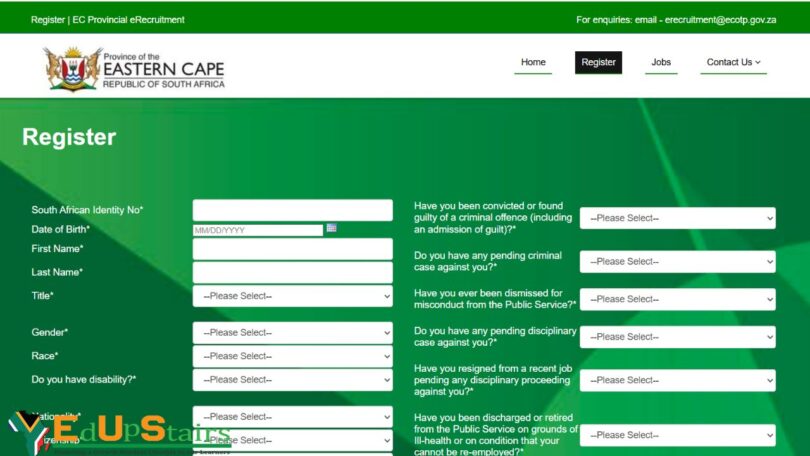
Step 2: Create an Account
Click on “Register” if you are a new user. You will need to:
- Provide your South African ID number
- Create a username and password
- Enter your email address and cell phone number
A verification link or OTP will be sent to your phone/email.
Step 3: Complete Your Profile
Once logged in, click on “Profile Details” and complete all sections:
- Personal Information: Name, ID number, gender, disability status, etc.
- Contact Details: Residential and postal address, email, phone
- Education: Fill in all your qualifications starting from Grade 12 upwards
- Employment History: Include any part-time or volunteer work
- Skills & Competencies: List all relevant soft and technical skills
- References: Add contactable references from school, previous jobs, or community projects
Important: Keep your profile accurate and updated. Incomplete profiles may be disqualified.
Upload Required Documents
Scan and upload certified copies of:
- ID Document
- Matric Certificate or other qualifications
- CV (Curriculum Vitae)
- Proof of Address (for EPWP jobs)
- Driver’s License (if required)
Files must be in PDF format, and each file should not exceed the size limit (usually 2MB).
Searching and Applying for Jobs
How to Search and Apply for Jobs
- Click on “Vacancies” on the dashboard
- Use the search bar or filters (like “EPWP”, “Internship”, “Learnership”, “Entry Level”) to find relevant posts
- Read the job description, requirements, and closing date
- Click “Apply” and follow the prompts
You can track your applications under the “My Applications” tab.
Tips for Success
- Apply before the closing date
- Double-check if your documents are clear and certified
- Tailor your CV to match the job or program requirements
- Check the portal weekly for new postings
- Don’t apply more than once for the same post
- Save or print your confirmation email after applying
What to Do After Applying
- Wait for communication via SMS or email for interviews or assessments
- Make sure your contact details remain updated
- Keep applying for other opportunities in the meantime
Conclusion
Registering on the Eastern Cape e-Recruitment system opens a gateway to numerous public sector opportunities, especially for the youth and unemployed citizens. Whether you’re eyeing a permanent entry-level role, an internship, a learnership, or temporary EPWP work — the system is designed to bring fairness, accessibility, and transparency to the job-seeking process.
Now that you’re equipped with the knowledge, take the first step. Create your profile today, upload your documents, and start applying. Your future in public service might be just one click away!
EDUPSTAIRS IS A REGISTERED NON-PROFIT ORGANISATION NPO No: 232 – 182, PUBLIC BENEFIT ORGANISATION (PBO): 930066984. EDUPSTAIRS DOES NOT, IN ANY WAY OR FORM, SOLICIT MONEY OR CV’S FROM PEOPLE FOR JOBS. PLEASE BE AWARE OF PHONY JOB POSTINGS AND RECRUITMENT FRAUD. FOR MORE INFORMATION VISIT OUR SCAM/FRAUD ALERT PAGE HERE
You May Also Like…
How to Register on the ESSA Labour Database for Government Jobs in 2025
How to Register for the Eastern Cape Qualified Unemployed Educators Database in 2025
How to Apply for the KwaZulu-Natal Qualified Unemployed Educators App Database in 2025